top of page


Executive Report With AI
Background
Executive Intelligence transforms organisational data into actionable leadership insight.
Every executive has a recurring need to understand the current state of the organisation before making decisions, meeting with their leadership team or reporting to the board.
Traditionally, this means reviewing multiple dashboards, reading departmental reports, analysing KPI trends and piecing together information from across the business to determine what is working, what is at risk and where attention is needed.
Executive Intelligence automates and expedites this process. It continuously analyses your strategic objectives, KPIs, projects and organisational performance to identify emerging risks, highlight progress and explain the factors driving change.
Instead of spending time gathering and interpreting information, executives receive clear, contextual insights that enable faster, more informed decision-making while keeping strategic execution aligned with business priorities.
For leadership teams, the value lies in the outcomes rather than the mechanism. Executive Intelligence reduces the time spent preparing and reviewing reports, identifies strategic risks before they become significant issues, explains why performance is changing and delivers concise, executive-ready summaries that support board and leadership discussions.
The result is that executives spend less time searching for information and more time leading the organisation—making timely decisions, driving accountability, focusing leadership discussions on the issues that matter most and improving organisational performance.
Below is a sample Executive Report that is automatically generated and emailed based on your organisational data, reporting preferences and preferred reporting cadence.


Introduction
This guide will show you how to use kippy and artificial intelligence to
-
produce an executive report
-
have the executive report emailed to you on your chosen schedule or immediately
-
personalise the executive report
-
continue the executive conversation with kippy AI
Set up
Register for kippy and upload your data. Alternatively, contact us for a free live demo.
Please note, the AI executive report is only available for users with the Manager role.
Generate
Go to the Executive Brief screen which is available under Home in the menu. You will see a message asking you to click the 🔄 UPDATE BUTTON to generate an AI summary. This will take about 1 minute to generate a executive report based on all the current data you have in kippy.

As you can see, the executive report is displayed with a number of high-level sections, insights and actions; which are all configurable, but by default include:
- Executive Intelligence
- Executive Challenge
- Executive Summary
- Leadership Focus
- Questions Leadership Should Ask
Schedule email
To have the executive report emailed to you on a regular basis, you can edit your profile and choose when to have it emailed to you.
Click the SCHEDULE button.
In the 'Include reports' multi-select drop-down list select the different types of reports you want emailed to you, including this Executive Report.
In the 'Previous reporting period (days)' multi-select drop-down list, select when you want this report (based on last months data) emailed to you (e.g. on 8th of the month, send a report with all of last month's data, for a monthly retrospective meeting). You may want to use this to see how the business has performed in last reporting period after it has been locked.
Likewise, in the 'Current reporting period (days)' multi-select drop-down list, select when you want this report (based on the current months data) emailed to you (e.g. Every Monday, send a report with all of the current month's latest data, for a weekly operational meeting). You may want to use this to see how the business is performing live on a weekly basis.
Now click SAVE PROFILE.

The selected reports (including the executive report) will now be re-generated and emailed to you on the selected days.
Personalise the executive report
To modify the report, edit the 'Report Hint'.
For example, you can save 'Translate to Arabic' or say 'Focus this report for a CFO'. The next time the report is generated or emailed, the hint will be considered during the generation.
Note, this hint is remembered and used per user for all executive reports, generated or scheduled, for all periods.

Continue the executive conversation with Kippy AI
The executive report is saved in your AI Chat conversations so you can see exactly how it is generated and continue the conversation by exploring insights, risks, recommendations and strategic questions with with follow-up questions to kippy AI.
To do this, click the chat icon (top-right), and retrieve this report from your chat history.

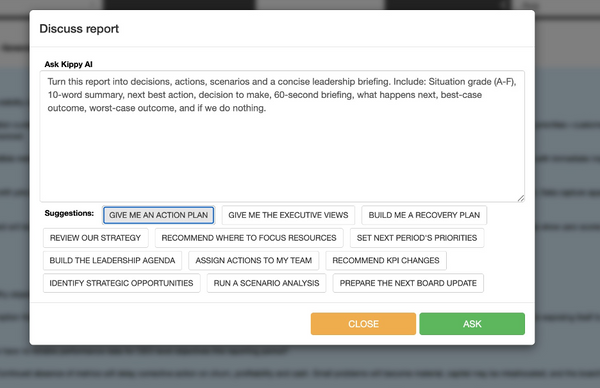
Discuss executive report and ask questions
You can also discuss the executive report with Kippy AI by clicking the Discuss button on the Executive Report screen.
The popup allows you to type in free form questions, or pick from one of the pre-populated suggestions.
Email executive report on demand
To generate an executive report email immediately, you can also click on the MAIL icon in the schedule pop up next to the previous and current drop downs.
And if you want the latest executive report emailed to you immediately and you are not at your desktop, you can also generate it on the go from the kippy mobile app by clicking the Email icon.

Other things to note:
- the executive report is personalised to each user based on when it was generated and what data you can see, so different people may each see different executive report.
- the executive report is generated for the current reporting period and the latest one generated per reporting period is displayed.
- you can go to historical periods and generate reports for those months. The Previous button provides a shortcut to view the previous months executive report.
- kippy administrators can set up report schedules for other users in Tools | Settings | Users.
Feel free to contact us if you need help getting setup or have any questions.
bottom of page